
Business profile photo explained: your 2026 guide
- Jeff Borchert
- Jun 22
- 8 min read

TL;DR:
A professional business profile photo helps build trust and makes a strong first impression online.
Getting the technical specs right and choosing authentic images increases engagement on platforms like Google and LinkedIn.
A business profile photo is a professionally crafted image that represents your brand identity and helps clients recognise and connect with your business across platforms like Google Business Profile and LinkedIn. Getting it right is not optional. Your profile photo is often the first thing a potential client, recruiter, or partner sees before they read a single word you have written. A strong image builds trust instantly. A weak one quietly costs you credibility before the conversation even begins. This guide covers the technical specs, composition principles, preparation steps, and ongoing management strategies that make a business profile photo work hard for your brand in 2026.
What is a business profile photo and why does it matter?
A business profile photo is the primary visual representation of your professional identity online. It appears on platforms like Google Business Profile, LinkedIn, your company website, and email signatures. The term “corporate headshot” is the standard industry phrase for the individual version of this image. Both terms describe the same goal: a clear, authentic photo that tells people who you are before you say a word.

First impressions form fast. Research in social psychology consistently shows that people make character judgements within seconds of seeing a face. On LinkedIn, that judgement happens before a connection request is accepted or a message is opened. On Google Business Profile, it shapes whether a customer feels confident enough to call or visit. A polished, professional business photo signals competence, approachability, and credibility all at once.
The importance of a business profile photo goes beyond aesthetics. It is a trust signal. Businesses and professionals with high-quality, authentic photos attract more engagement than those with blurry, outdated, or stock images. That engagement translates directly into calls, clicks, and connections.
What are the technical specs for business profile photos on key platforms?
Getting the technical side right is non-negotiable. Each platform has specific requirements, and ignoring them leads to cropped faces, blurry thumbnails, and rejected uploads.
Google Business Profile photo specs
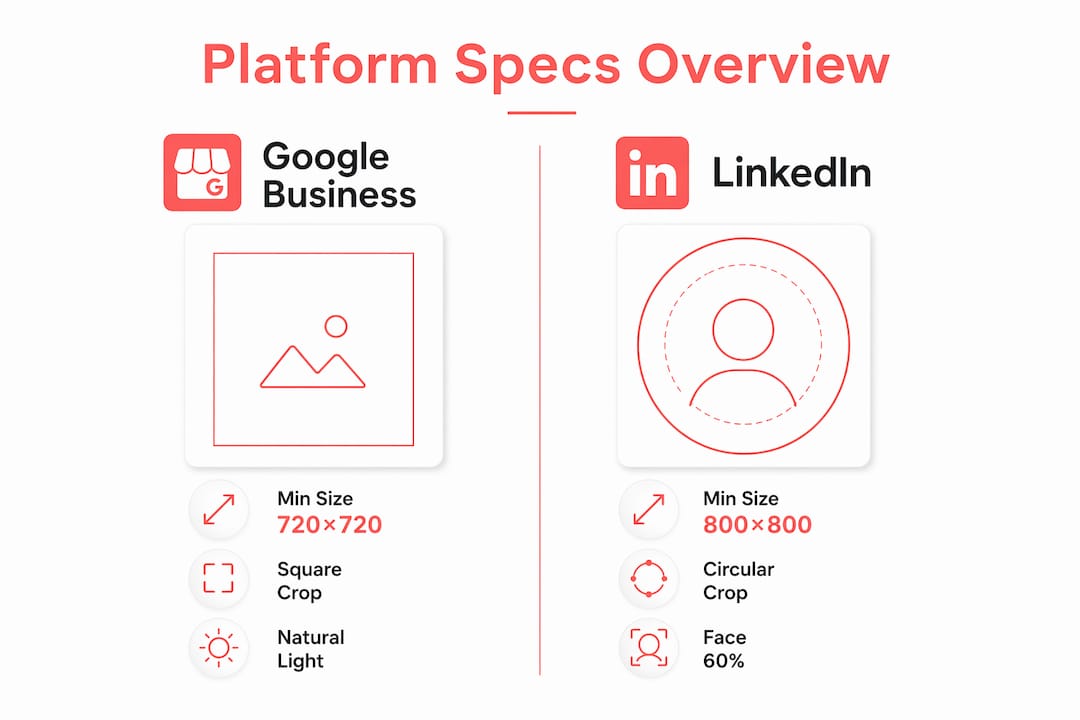
Google Business Profile photos must be square images with a minimum size of 720×720 pixels. For the best quality, upload at 1,200×1,200 pixels. The accepted formats are JPG and PNG. Google displays profile photos with a circular crop, which means anything near the edges of your image will be cut off. Centring your subject is critical. A face or logo pushed to one side will be partially hidden in the final display.
Google also rejects blurry, dark, or heavily processed images. The platform favours realistic, well-lit photos that accurately represent your business. Filters and artificial enhancements are a fast track to a rejected upload.
LinkedIn profile photo specs
LinkedIn recommends a square photo with a minimum resolution of 800×800 pixels. The face should fill approximately 60% of the frame. That specific ratio exists because LinkedIn displays photos in a circular crop at a small thumbnail size. If your face is too small in the frame, your eyes and expression become invisible in search results and connection requests. Direct eye contact and a clean, contrasting background complete the formula.
Platform | Minimum size | Recommended size | Crop style | Face fill |
Google Business Profile | 250×250 px | 1,200×1,200 px | Circular | Centred subject |
800×800 px | 1,200×1,200 px | Circular | ~60% of frame |
Pro Tip: Compose your photo with the circular crop in mind from the start. Shoot with extra space around the subject, then centre the face during editing. This gives you flexibility without losing critical detail to the crop.
Why does your business profile photo affect credibility and online presence?
A quality profile photo does more than look good. It actively influences how platforms rank your business and how customers behave when they find you.
On Google Business Profile, photo freshness and engagement are signals that affect your local ranking and the actions customers take, including calls and direction requests. Businesses that regularly add new, relevant photos stay more visible in Google Search and Maps. A stale profile with a single outdated photo sends the wrong signal to both the algorithm and the customer.
On LinkedIn, high-quality professional photos lead to measurably more profile views, connection requests, and recruiter outreach. The photo is the first filter. Professionals with strong images get further into the conversation before a single word of their profile is read.
The importance of business profile photos also comes down to authenticity. Google explicitly favours original business photos over stock images or unrelated visuals. Photos of your actual storefront, team, products, or workspace help customers identify your business in Search and Maps. Stock photos feel generic and can actually undermine trust.
Strong business profile photo choices include:
A clean, well-lit corporate headshot for individual professionals
A team photo showing real people in a real workspace
A storefront or office exterior for location-based businesses
Product or service photos that reflect what you actually offer
Event or behind-the-scenes images that show your brand in action
Each of these options builds a more complete and trustworthy picture of who you are and what you do.
How to prepare for a professional business profile photo shoot
Preparation is where most people either win or lose the session before the camera is even turned on. Good preparation leads to relaxed, natural expressions. Poor preparation leads to stiff poses and a photo you will never want to use.
Start communication early. Brief everyone involved at least two weeks before the shoot. Share the purpose of the photos, where they will be used, and what the expected look and feel is. People who know what to expect show up calmer and more confident.
Schedule enough time per person. Allowing 20–30 minutes per person reduces time pressure and improves comfort. Rushed sessions produce forced expressions. Ample time lets people settle in, try a few angles, and find their natural look.
Choose wardrobe carefully. Solid colours photograph better than busy patterns. Avoid colours that blend into your background. For teams, coordinate without matching exactly. A consistent colour palette creates a cohesive look across a full set of headshots without making everyone look like they are wearing a uniform.
Think about background and setting. A clean, neutral background keeps the focus on the face. If you want an environmental shot (office, workshop, studio), make sure the space is tidy and reflects your brand well.
Prepare your expression and posture. Shoulders back, chin slightly forward and down, and a genuine smile or calm, confident expression. Practice in a mirror the day before. It sounds basic, but it works.
Pro Tip: For team shoots, assign one person as the internal coordinator. They confirm wardrobe, manage the schedule, and keep things moving. This single step saves significant time on the day and keeps the energy positive.
Itsjeffb builds this kind of preparation into every team headshot session, guiding clients through wardrobe, timing, and positioning so the day runs smoothly and the results are consistent across the whole group.
How do you keep your business profile photos working over time?
A great photo does not stay great forever. Platforms reward freshness, and your audience notices when your image no longer looks like you.
Keeping your profile photos current and relevant requires a few consistent habits:
Update your photo every one to two years, or sooner if your appearance, role, or brand changes significantly. An outdated photo erodes trust when someone meets you in person and you look different from your profile.
Add seasonal or event photos to your Google Business Profile regularly. New images signal activity to Google’s algorithm and give customers a reason to look at your profile again.
Monitor engagement on your photos. Google Business Profile provides basic photo view data. If certain images consistently attract more attention, use that as a guide for future photo choices.
Avoid heavy filters and over-editing. Google may reject images that look artificially processed. Beyond platform rules, heavily filtered photos look dated quickly and can make you appear less trustworthy.
Audit your photos across all platforms at least twice a year. LinkedIn, Google, your website, and your email signature should all show the same current, consistent version of you.
Consistency across platforms matters more than most professionals realise. When your photo matches across Google, LinkedIn, and your website, you build recognition. People remember faces. A consistent image means they remember yours.
Key takeaways
A business profile photo is one of the highest-return investments a professional can make, because it shapes trust, engagement, and visibility before a single word is read.
Point | Details |
Platform specs matter | Google needs 720×720 px minimum; LinkedIn needs 800×800 px with the face filling ~60% of the frame. |
Circular crops change everything | Centre your subject and compose with the circular mask in mind to avoid cropping key details. |
Authenticity outperforms polish | Original, realistic photos outperform stock images on Google and build stronger trust on LinkedIn. |
Preparation improves results | Scheduling 20–30 minutes per person and briefing teams two weeks ahead leads to natural, consistent photos. |
Freshness drives ongoing impact | Regularly updated photos signal activity to Google’s algorithm and keep your profile visible and credible. |
What I have learned from shooting business profile photos
I have photographed a lot of professionals who walked into a session convinced they were “not photogenic.” That phrase is almost always code for “I have never had a photo taken by someone who made me feel comfortable.” The technical specs matter, yes. But the biggest factor in a great business profile photo is whether the person in front of the camera feels at ease.
The best headshots I have ever taken happened in the last five minutes of a session, once the nerves settled and the person stopped thinking about the camera. That is why I build time into every session. Rushing is the enemy of a natural expression.
I also see a lot of professionals invest in a great photo and then leave it untouched for five years. Your photo is a living part of your brand. When it no longer looks like you, it creates a small but real moment of confusion every time someone meets you in person. That confusion is a crack in your credibility. Keep it current.
The other thing I push back on is the idea that a business profile photo needs to be stiff or formal to be professional. The most effective photos I have seen, across multiple industries and roles, are the ones where the person looks like themselves on a good day. Approachable, confident, and real. That combination builds more trust than a perfectly pressed suit and a forced smile ever will.
— Jeff
Ready to get a business profile photo you are proud to use?
Getting a strong business profile photo does not have to be complicated. At Itsjeffb, sessions are built to be guided, low-pressure, and outcome-focused, so you walk away with images you actually want to put on LinkedIn, your website, and your Google Business Profile.
[
Check out the monthly headshot special for an affordable way to get a clean, professional photo that works across every platform. For companies looking to update their whole team, the corporate team headshot service brings the session to your office with consistent results across every person. Your profile photo is working for you (or against you) right now. Let’s make sure it is doing the right job.
FAQ
What is a business profile photo?
A business profile photo is a professional image used to represent an individual or business on platforms like LinkedIn, Google Business Profile, and company websites. It is the primary visual that shapes first impressions and builds trust with potential clients and partners.
What size should a business profile photo be?
Google Business Profile requires a minimum of 720×720 pixels, while LinkedIn recommends at least 800×800 pixels. Uploading at 1,200×1,200 pixels works well for both platforms.
How often should I update my business profile photo?
Update your business profile photo every one to two years, or sooner if your appearance or role changes significantly. Regular updates also signal activity to Google’s algorithm, which can improve your local search visibility.
Why does my face need to fill 60% of the frame on LinkedIn?
LinkedIn’s circular crop and small thumbnail display make facial details hard to see when the face is too small in the frame. Filling approximately 60% of the frame keeps your eyes and expression visible and engaging in search results.
Can I use a stock photo as my business profile photo?
Google explicitly favours original business photos over stock images. Stock photos reduce trust and can be flagged by the platform. Use a real photo of yourself, your team, or your actual business location instead.
Recommended


Comments