
Role of photography for corporate websites: a guide
- Jeff Borchert

- May 15
- 8 min read

TL;DR:
Professional photography on corporate websites fosters trust, credibility, and higher engagement with authentic visuals. It significantly improves conversion rates and reduces bounce rates by showcasing genuine team and environment images. Consistent planning and optimization ensure images support web performance, SEO, and cohesive brand identity over time.
Your corporate website has about 50 milliseconds to make a first impression. The role of photography for corporate websites goes far beyond decoration. It shapes whether visitors trust you, stay on your page, or quietly click away. Yet most businesses in Calgary still rely on generic stock images or outdated team photos that actively undermine the credibility they’ve spent years building. This guide breaks down the evidence-backed reasons why professional photography is a business asset, not a budget line, and gives you a practical framework for getting it right.
Table of Contents
Key Takeaways
Point | Details |
Photography builds trust | Authentic professional images quickly establish credibility and engage website visitors. |
Images boost conversions | Sites with professional photos show significantly higher engagement and conversion rates. |
Optimize for speed | Proper image compression and SEO-friendly alt text improve site performance and search rankings. |
Plan strategically | Coherent photo sessions aligned with website needs ensure consistent and reusable branding assets. |
Local expertise matters | Calgary firms benefit from specialized corporate photography tailored to their branding goals. |
How professional photography builds trust and credibility
First impressions on a corporate website are almost entirely visual. Before a visitor reads a single word, they’ve already formed an opinion about your company based on what they see. Blurry headshots, mismatched lighting, and obviously staged stock photos send a quiet but clear message: this company doesn’t pay attention to details.
Professional photography establishes credibility by replacing generic stock imagery with authentic visuals that reflect your real team and real environment. That authenticity builds immediate trust. When a visitor sees a genuine photo of the person they’ll be speaking to, or the actual office they might visit, it removes doubt and creates connection.
The numbers back this up strongly. LinkedIn profiles with professional headshots receive 21 times more views and 9 times more connection requests compared to those without. That same principle applies directly to your website. Authentic, high-quality images of your people signal competence before a word is read.
Here’s what consistent, professional imagery communicates to your visitors:
Trustworthiness. Real faces, real spaces, and real product shots signal you’re not hiding behind a brand façade.
Attention to quality. If your photos are polished, visitors assume your services are too.
Cultural fit. Team photos convey personality, values, and what it’s like to work with you.
Professionalism. Consistent lighting and editing across all photos shows intentional brand management.
“Your website imagery is often the first handshake you offer a potential client. Make it firm, warm, and memorable.”
Understanding why team headshots matter for Calgary businesses specifically comes down to one thing: people buy from people. A professional headshot closes that psychological gap between a website visitor and a purchasing decision.
The impact of photography on user engagement and conversion rates
Trust alone doesn’t pay the bills. But engagement and conversions do. And professional photography has a measurable, documented effect on both.

Professional photography on product or service pages converts 2 to 3 times higher than amateur shots, with 35 to 45% higher engagement than stock imagery. Think about what that means for a Calgary professional services firm. If your contact form is receiving 20 enquiries a month, that same page with professional imagery could realistically be generating 40 to 60. The photos are doing the selling.
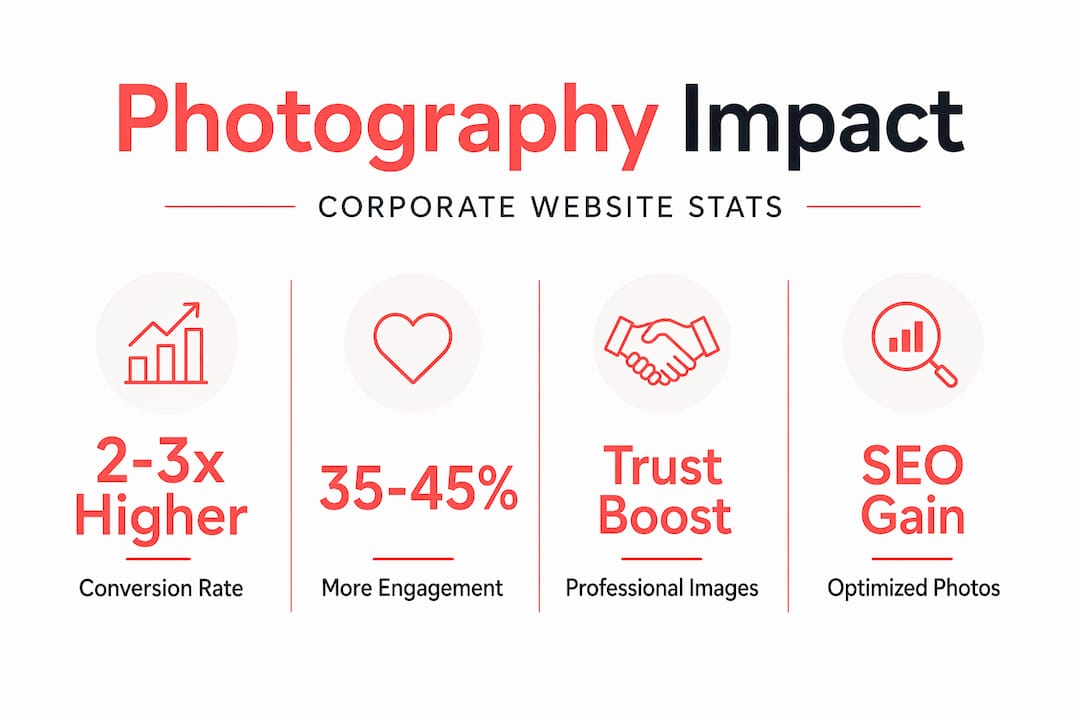
Bounce rate tells another part of the story. When visitors land on a page that doesn’t look credible, they leave. Professional imagery reduces bounce rates by 15 to 25% and increases time on page by 30 to 40%. More time on page means visitors are reading your services, reviewing your team, and moving closer to a decision.
Why does this happen? A few reasons:
Stock photos trigger a subconscious “I’ve seen this before” reaction that erodes trust.
Authentic images hold attention because they’re specific and novel.
Visual consistency across your site reduces cognitive friction, making navigation feel smoother.
Genuine photography of your team and services answers questions that copy can’t.
The strategic insight here is that professional photos elevate your brand in ways that accumulate over time. Every page a visitor opens, every team member they see, every product shot they evaluate, the visual quality compounds into a holistic impression of your company.
Stat worth bookmarking: Pages with professional photography see engagement rates 35 to 45% higher than those relying on stock imagery. For a corporate site actively generating leads, that gap directly affects revenue.
Optimizing photography for web performance and SEO
Here’s where a lot of companies leave value on the table. They invest in a professional photo session, then upload full-resolution images directly to their website. The result? Beautiful photos that take five seconds to load and tank their Core Web Vitals scores.
Great photography and great web performance have to work together. Here’s how to make sure they do:
Compress images below 200KB for desktop. Optimized images under 200KB improve Core Web Vitals, and pages averaging under 150KB consistently achieve “Good” scores. Use tools like Squoosh or ShortPixel before uploading.
Use modern file formats. Convert your photos to WebP or AVIF. These formats deliver comparable quality at significantly smaller file sizes compared to JPEG or PNG.
Prioritize your LCP image. The Largest Contentful Paint image (the hero image most visitors see first) should never be lazy-loaded. Avoid lazy-loading your LCP image above the fold. Use "fetchpriority=“high”` and keep it under 100KB for mobile.
Write descriptive alt text. Alt text isn’t just for accessibility. It tells search engines what your image depicts, contributing to your SEO. A photo of your Calgary accounting team should have alt text like “Calgary accounting team in boardroom” rather than “IMG_4823.”
Use consistent file naming. Name files descriptively before upload: “calgary-corporate-headshot-jeff-smith.webp” outperforms “DSC00347.jpg” for search indexing and long-term asset management.
Serve responsive images. Use srcset attributes to serve appropriately sized images on mobile. A 1400-pixel-wide desktop hero image served to a mobile phone wastes bandwidth and slows load time.
Pro Tip: Before your photo session, brief your photographer on the specific dimensions and placement of images on your website. A hero image needs different framing than a thumbnail. Planning ahead saves expensive reshoots and ensures every image is usable immediately.
Planning and managing corporate photography for brand consistency
One of the most common mistakes I see Calgary businesses make is treating photography as a one-time event rather than an ongoing brand asset. A single session, no plan, and then three years of inconsistent photos accumulating across their website. It shows.
Plan photography sessions strategically around your website structure to create a cohesive library of portraits, lifestyle, behind-the-scenes, and detail images. Each section of your website has a visual need. Your homepage hero tells a different story than your About page team grid or your Services detail shots.
Here’s a practical shot list framework to bring to your next session:
Hero shots: Wide, lifestyle-oriented images that set tone and context for each key page.
Team headshots: Consistent backgrounds, lighting, and cropping across every individual.
Behind-the-scenes: Candid moments of your team at work, in meetings, or on-site. These humanise your brand.
Service or product detail shots: Close-up, specific images that answer “what exactly do you do?”
Brand detail shots: Logos on signage, branded materials, your space. These support a sense of place and identity.
Develop brand-specific colour grading presets and lock compositional rules like symmetrical framing for visual coherence, even when different photographers are involved. This is what separates companies with strong visual identities from those whose websites look like a collage of different eras.
Image type | Best use on site | Refresh frequency |
Team headshots | About page, team directory | Every 2 to 3 years |
Hero lifestyle images | Homepage, service pages | Annually or with rebrand |
Behind-the-scenes | Culture/careers page, blog | Quarterly |
Detail and product shots | Service pages, portfolio | As services evolve |
Event photography | News, social proof sections | Per event |
Pro Tip: Batch your photography needs into one well-planned session. A corporate photography planning session that covers headshots, lifestyle images, and brand details in one day costs significantly less than booking three separate sessions and keeps your entire visual library consistent in look and feel.
Maintaining team headshots for consistency across your roster is especially important as teams grow. When a new hire’s headshot looks visually out of place next to the rest of the team, it signals instability rather than growth.
Rethinking the role of photography in corporate branding
Here’s my honest take after working with Calgary businesses for years: most companies treat photography as a cosmetic upgrade. Something you do when the website looks “a bit dated.” That framing costs them money they never see leaving.
Photography isn’t decoration. It’s a conversion mechanism. Images reduce uncertainty and build subconscious trust, particularly in online environments where clients can’t physically inspect your work or meet your team in person. Every visitor to your site is making a purchasing decision without shaking your hand. Your photos are doing the handshaking for you.
The uncomfortable truth is that poor imagery creates an invisible revenue leak. You won’t see a line item that says “lost due to bad photos.” But the leads that bounce, the RFPs that never come in, the clients who chose a competitor whose website felt more credible, those losses are real even if they’re invisible.
I’d also push back on the idea that “good enough” photos are acceptable for a corporate website. Your clients are not consciously judging your photography. They’re forming feelings about your company, and those feelings drive decisions. The strategic use of photography is really the strategic management of how your company feels to someone who’s never met you.
Integrating photography with your website design and SEO from the start (not as an afterthought) is the shift that separates brands with real presence from those with just a functional website. It’s the difference between a site that converts and one that just exists.
How Jeff B Photography supports Calgary businesses’ corporate branding needs
Now that you understand the full weight of professional photography as a business tool, the next step is getting it done with someone who knows Calgary’s corporate landscape.
[
At Jeff B Photography, I specialise in delivering clean, natural, and professional imagery that’s built to perform on your website, your LinkedIn, and your marketing materials. Sessions are planned around your brand’s specific needs, whether that’s Calgary’s best headshots for a growing team or a full brand imagery day that covers everything from hero shots to detail photography. The process is guided, efficient, and designed to be genuinely easy, even for anyone who isn’t thrilled about being in front of a camera. If you’re an HR manager or marketing lead wondering where to start, the company photo session guide is a great first read. Let’s get your brand looking as strong as the work you actually do.
Frequently asked questions
Why is professional photography important for corporate websites?
Professional photography builds trust by replacing generic stock photos with authentic imagery, improving user experience and directly leading to higher conversion rates on corporate websites.
How does image optimisation affect website performance?
Optimized images under 200KB improve Core Web Vitals scores, resulting in faster load times, better SEO rankings, and a smoother experience for visitors on all devices.
What types of corporate photos should I prioritise for my website?
Focus first on authentic team headshots, a strong homepage hero image, and service-specific detail shots, then build out your library with brand photography sessions that cover lifestyle, behind-the-scenes, and branded environment shots.
How often should professional headshots be updated on corporate sites?
Professional headshots remain effective for roughly 2 to 3 years, after which refreshing them helps you maintain a current, credible presence and keeps your team page looking consistent as your company grows.
Recommended
Comments